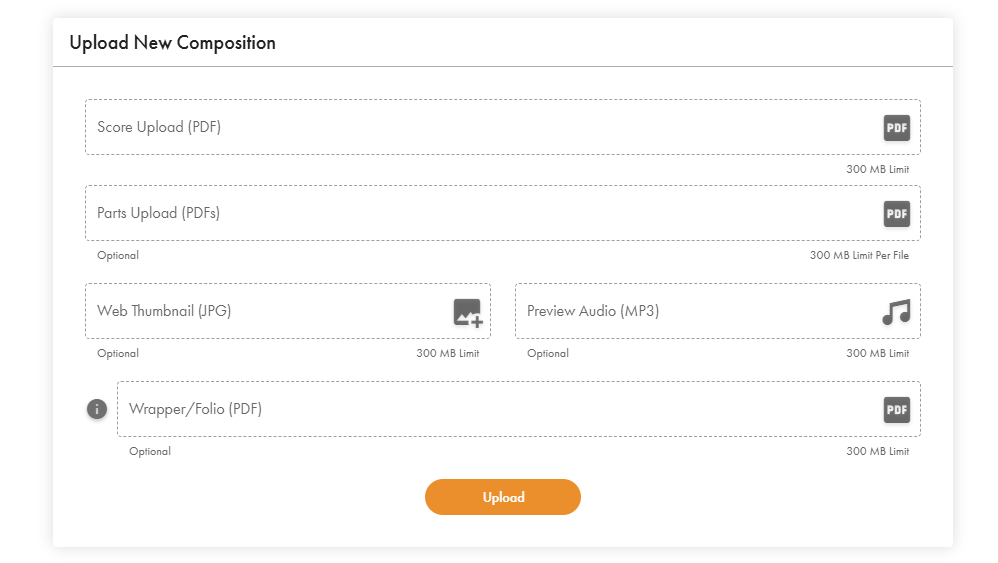
You will want to account for 2 separate items (3 if you are uploading a large ensemble piece such as concert band or orchestra) for covers to display and print correctly:
1. Cover Page JPEG file to go in the "Web Thumbnail" field - this will be the web thumbnail that displays on the website so customers can see your cover art when browsing jwpepper.com. This should be in portrait format. Ideally, thumbnail images should be around 1500x2000 pixels for the best visual quality on jwpepper.com.
2. A score PDF with a cover page included in the file if you want your cover page printed on your score
3. (For large ensembles only) A wrapper PDF that will be used to print on the jacket that will go around your instrumental parts.
When uploading new music to My Score, you will want to have a cover page included in your score if you would like the cover to also be printed on the booklet of your score. The wrapper will be in its own PDF file as it is a separate jacket placed around the parts in a large ensemble set.
Please note: For Cover Stock options that are available for all scores except vocal scores/octavos (this includes Solo & Ensemble chamber works), the document must follow the rule of 4 and there must be 2 blank pages in both the front and back (these blank pages can have words on them such as cover pages, table of contents, information about the composer, etc., but cannot display any music).
You can read more about wrappers in our support article on the subject here - What is a wrapper?
Was this article helpful?
That’s Great!
Thank you for your feedback
Sorry! We couldn't be helpful
Thank you for your feedback
Feedback sent
We appreciate your effort and will try to fix the article