- From the Catalog page
- Click the Pencil Icon below the product you want to edit
- Click the pencil Icon to the right of the description
- From here you can update the Format, Voicing, and Style
How do I update the Style of my item?
- From the Catalog page
- Click the Pencil Icon below the product you want to edit
- Click the pencil Icon to the right of the description
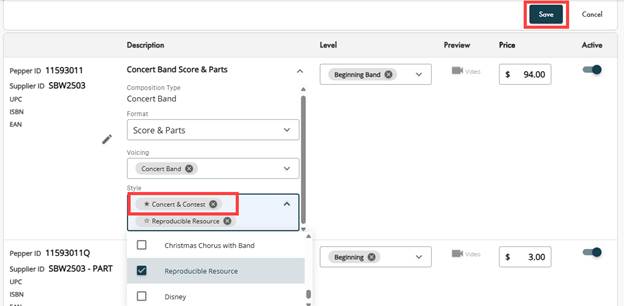
- Using the Style Dropdown
- You can choose up to four different styles per item.
- Indicate the Primary style by clicking the star to the left of the item in the list.
- Save
- Publisher Changes? Confirm to Accept or Cancel to return to the edit page
How do I update the Format of my item?
- From the Catalog page
- Click the Pencil Icon below the product you want to edit
- Under the Pepper ID
- Click the Pencil Icon
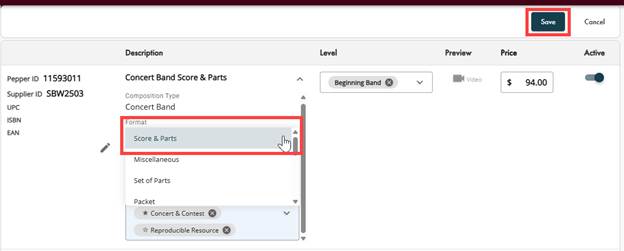
- Using the Format Dropdown
- You can choose one format option
- Save
- Publisher Changes? Confirm to Accept or Cancel to return to the edit page
How do I update the Voicing of my item?
- From the Catalog page
- Click the Pencil Icon below the product you want to edit
- Click the pencil Icon to the right of the description
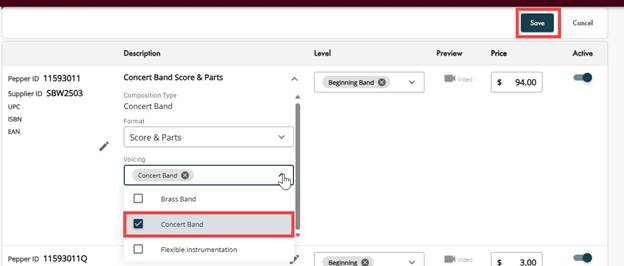
- Using the Voicing Dropdown
- You can choose up to four different voicings per item.
- Indicate the Primary voicing by clicking the star to the left of the item in the list.
- Save
- Publisher Changes? Confirm to Accept or Cancel to return to the edit page
Was this article helpful?
That’s Great!
Thank you for your feedback
Sorry! We couldn't be helpful
Thank you for your feedback
Feedback sent
We appreciate your effort and will try to fix the article