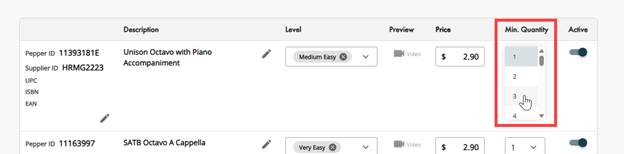
Minimum quantity is available on choral products and lets you set the minimum number of copies a customer must purchase.
- From the Catalog page,
- Click the Pencil icon below the product you want to edit.
- Under Min. Quantity, use the dropdown to select the minimum selling quantity for your item.
- Click Save.
- Publisher Changes? Confirm to Accept or Cancel to return to the edit page
Was this article helpful?
That’s Great!
Thank you for your feedback
Sorry! We couldn't be helpful
Thank you for your feedback
Feedback sent
We appreciate your effort and will try to fix the article